

Best Practices
Trim, Binding & Finishing Clearances


Keep all FOIL3D™ and SculptedUV™ elements at least 1/16” away from trim edges.
These enhancements cannot bleed off the edge, as trimming and finishing may cause chipping or damage.
For books and catalogs, allow additional clearance from the binding edge for enhancements.
Coil-bound and saddle-stitched pieces can typically use 1/8” (on both sides of the fold), while perfect-bound books require more space; a 1/4” minimum is recommended (from the edge of the spine).

Line Weight & Typography Guidelines
Maintain a minimum stroke width of 1 point
All foils and lamination options have a chance of behaving slightly different, depending on the pairing. To ensure proper adhesion, durability, and clarity of your artwork, a 1 pt stroke is recommended as the very minimum width for FOIL3D™ and SculptedUV™.
Matte foil for legibility
Matte foil is recommended for smaller text sizes, as it generally offers better legibility than high-gloss foil.
Minimum font size guidelines
(Based on a standard “regular” font weight)
-
Sans Serif – 8 pt minimum
-
Serif – 10 pt minimum
-
Script – Varies by design
As a general rule, the thinner and more intricate the font, the larger the size should be.

General File Setup
Separate Enhancements from Base Layer
Remove any elements receiving foil from the CMYK print layer. Enhancement artwork should exist only on its designated enhancement layer. Leaving foil elements on the base print layer may cause printed ink to show through if even slight registration shifts occur.
Double Check your Work
Ensure your foil and/or SUV layers are separated properly; this way, no unintentional layering of enhancements occurs in production.
01

Base Artwork
Your base CMYK artwork is the first step in the finishing process. Your file should contain at least 0.125" of bleed. Anything receiving FOIL3D™ should be removed from this layer. For this example, the SculptedUV™ will be printing blind over the background, so that has also been removed from this layer.
02

Foil3D
Foil application is the next step in the production process. For this example, there is only one foil color being used; if you use multiple foils, they must be divided onto their own individual layers and labeled accordingly.
03

SculptedUV
SculptedUV™ is applied after the foil. If you do not wish to have any SUV overlapping your foil, make sure to knock out the artwork receiving the foil from this layer. The pattern is kept 1/16" away from each side.
04

Finished Product
A digital rendering showing what blind SculptedUV™ with Shiny Silver FOIL3D™ would look like for this piece.
This is a basic setup guide for enhancement files. Please review the in-depth guides for your preferred program at the top of this page for more details on how to build and create your files accurately.
SculptedUV™ Application
Standard vs. Blind Sculpting
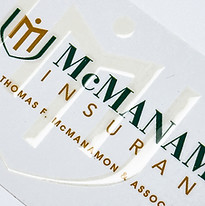
SculptedUV™ may be applied over printed artwork to enhance specific design elements, or used as a “blind” application. Blind sculpting adds raised texture without relying on underlying printed ink, creating visual and tactile interest through the UV enhancement alone, typically over a solid background color.
Recommended Color Application
SculptedUV™ is not recommended over white or very light base colors. When applied over white or light-colored inks, the UV coating can introduce a subtle yellow cast that becomes more noticeable in lighter areas. The glossiness and shine are also not as noticeable over white. The enhancement is most effective when used over darker colors, where the finish is more visually pronounced and any color shift is not visible.
Helpful Tips
Less is More
More coverage does not always produce better results. A lighter, more intentional use of FOIL3D™ or SculptedUV™ often delivers a cleaner, more impactful finish. In many cases, less is more.
Advanced Options

Layer Your Foils
FOIL3D™ and SculptedUV™ can be layered on top of a base foil to add depth and visual impact.
Double-sided enhancement is possible.
FOIL3D™ and SculptedUV™ may be applied to both sides of a single or folded sheet (Can not be used on inside pages of books or catalogs).